One of the promises of AI is freedom from the drudgery of boring work. At work I have had some success in using Copilot to migrate some AWS Lambdas off of some deprecated observability tooling. In this post I will go over how I am using agentic workflows and leave some tips at the end.
These days there can be quite a bit of debate between developers around the usefulness of Generative AI (LLMs) and Agentic Workflows in development. Currently, I come down in the camp of “we don't know”. What we do know is it gives great gains for some tasks. For other tasks it might be better not to use these new tools. That means ignoring the marketing clown-cars, explaining to execs what is plausible at the moment, and learning what actually works and what is currently useful.
One area where I have found success is in alleviating toil. Let me tell you how the deprecation of a feature in Datadog caused hundreds of hours of toil across 250+ repositories.
Setting the scene
Imagine this scenario. You have close to 2k repositories in your GitHub organisation, spread across almost 60 teams. All these teams use Datadog for observability. Furthermore, many teams have gone hard on AWS Lambda over the last few years (I will reserve comment).
Now imagine this. Datadog is disabling the deprecated way that many of these Lambdas are sending custom metrics. The impact of this is that 250+ repositories across the organisation need to be updated in about a month.
This is the worst kind of work to be asking teams to do because other than keeping metrics working, it has no return on investment (ROI).
When doing this kind of work:
- The metrics already exist, so no new capabilities are added.
- Existing code is replaced by new code but the overall maintenance burden remains about the same.
It is straight up maintenance work to keep the lights on.
If this kind of work can be reduced, it should be. It's boring. It adds no value. Automating it… that has ROI. Recognising this, we went about trying to automate it. And of course, we used AI.
The Plan
When hearing about the scale of this work, it was obvious to me that we needed to reduce the effort required by the teams.
Going into this, I knew any solution needed to check certain boxes:
- It needed to significantly reduce the work required of teams to migrate.
- Teams would still be responsible for their stack.
- We needed to be able to track the progress of the migration.
- Build on top of existing tools in the ecosystem since there is a hard deadline.
GitHub Copilot is already heavily used in our organisation and integrates well with the GitHub ecosystem. This made GitHub Projects and Issues ideal tools for tackling this challenge.
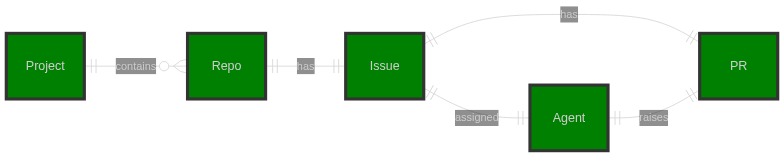
Here's how the workflow operates: GitHub Projects tracks progress across repositories with minimal effort. We assign issues to the project, then use those issues as prompts for the Copilot agent. When assigned to an issue, Copilot creates a PR linked back to that issue. Teams can then review and merge the PR or make changes as needed.
The Experiment
Firstly, like with a lot of agent usage, the bulk of the work and the quality of the result depends on crafting a really good prompt. I spent hours going through the diff from a PR that was upgraded manually, pulling out the important code examples to put into the issue.
Manually creating issues and assigning Copilot to them on a few repositories has yielded really promising results so far. The agent made the changes correctly across multiple Lambdas, even detecting when no changes were needed because the change had already been done manually.
Scaling up
It turns out using Copilot when dealing with an organisation account is a bit more complicated, so last weekend I decided to test the idea of using GitHub Projects to make the same change across multiple repositories.
.NET 10 just released so I figured upgrading a couple of my open-source projects using this approach makes for a great test case.
To create this structure in GitHub I created a script (available here) that sets everything up from the following YAML config.
job:
  title: "Upgrade to .NET 10"
  org: "dburriss"

repos:
  - "wye"
  - "fennel"
  - "unique"
  - "overboard"
  - "event-feed"

issue:
  template: "./dotnet-upgrade-to-10.md"
After running the script against the above file, you have a project with linked issues and the status for each.
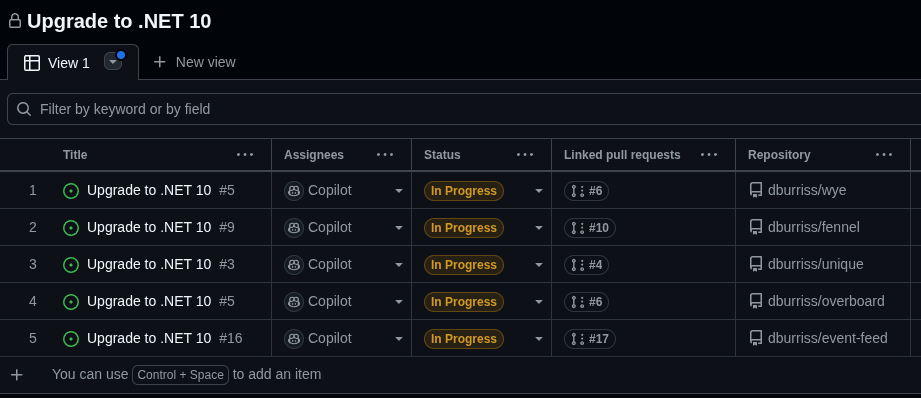
This allows tracking of the overall progress. So what have I learned so far about creating this kind of solution?
Tips
Learn and improve iteratively
Do at least 1 or 2 upgrades manually to learn about what changes need to be made. Then feed back the experience into crafting a good issue template. This follows the general rule of doing something manually, writing down the steps, then automating.
Once you have a good template, try it manually on a few repositories. Create the issue, manually assign the agent to it. Keep feeding back any learnings into the issue template. Then scale up.
Give enough context
I suggest having the following elements in the issue template:
- Role of the agent i.e. “You are a senior .NET developer”
- Objective - what are you trying to achieve
- Instructions - the steps that should be followed
- Context - any context needed for the instructions to be followed well
- Examples - examples of the kind of changes expected (get these from the manual work done initially)
See the example dotnet-upgrade-to-10.md here.
A word of warning. Don't go too overboard with the prompt. Having too much in your context can degrade results just as much as not enough. The Copilot context will have the GitHub and Playwright MCPs in it already. It will contain your issue text. It will also gather context from your codebase.
Automate verification
It is important to have an automated way of identifying regressions. If you have a verification step, the coding agent can use it to identify regressions and fix them before a human ever has to look at the change.
I want to call out something important in the instructions which can be seen when the agent executes the job. I have the following instruction: “Run dotnet build and dotnet test before changing anything to verify everything is working before changes”. It is important that you and the coding agent know if the tests were failing (usually because something is missing in the agents sandbox environment). If this is only identified after the change, it is more difficult to know the cause.
Agent friendly environment
Extending on the point above, you increase the chances of good outcome by preparing your repository to be agent friendly. Make sure that the agent can build and run your tests, linters, etc. This may mean customising the sandbox environment so the agent has what it needs.
As important is that the agent has clear instruction for this repository. This means making sure you have an AGENTS.md file that includes at a minimum:
- how to build and test the project
- the repository’s tech stack
- standards that need to be followed
- for more complex codebases, point to an ARCHITECTURE.md file or similar to help the agent with the structure
This tip and the previous 2 makeup a workflow that I recommend for migrations. See here for more.
Have a rollback plan
Even if you move slowly, once you scale out you might run into unknowns that were not accounted for in your prompt or preparation. I suggest 2 things:
- Make your rollout script as idempotent as possible. This would allow you to retry, add new repositories, etc. as you learn.
- Create a good cleanup script that can bin the project, issues, and Pull Requests and allow you to start over if need be.
Check out my example rollout script and cleanup script as an example.
Humans in the loop
It is important to remember that these agents have no mental model of the world, your business, or even the codebase. Make sure that as an engineer you are reviewing the changes proposed carefully. At the end of the day, a human will always be accountable for a change, even if a coding agent wrote the code. For the foreseeable future, this will remain the case. Do not give up your critical thinking!
Conclusion
Being able to now automate this type of work easily and effectively means we should be doing so. This will give teams back hours and even days of tedious work. This time can then be spent adding features that add value to a company.